Computer Applications I :: Projects :: Computer Company
Problem
You have just been hired at a computer company. Your first assignment for the company is to create a spreadsheet that shows all the company expenses for the last six months.
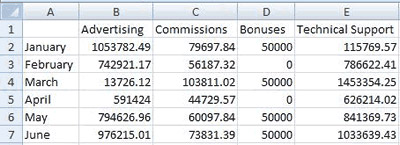
The information for this table is given below, but it has not yet been set up in an easy-to-understand way. One of your main concerns is to set up this spreadsheet so that it is easy to understand, plus you want to impress your boss with you knowledge of Excel.
The name of the company is Home Network Computers. The spreadsheet will display various expenses from the first six months of the current year starting with January and ending in June. Your boss also wants you to find the total for each expense and the total for each month.
Instructions
- The title of the spreadsheet should be the name of the company. Make sure you merge and center this title above the table.
- You will need to take the data above and create a spreadsheet that displays it in an easy-to-read format.
- Make sure that all numbers are formatted as Currency Style.
- Use AutoSum to find totals for each expense.
- Use AutoSum to find totals for each month.
- Be sure to style the spreadsheet to make it look more professional.
- Enter the AutoSum of either ALL Expense totals or ALL monthly totals below then click the button. If the answer is correct then all your numbers should be correct.
- Create a bar chart that will include all data EXCEPT for totals.
- Label this chart: Expenses (January through June)
- Make sure all of the data fits the chart so it is easy to read.