AP Computer Science :: Lessons :: The Java String Class

Chapter 5
Pages 188 - 194
Fundamentals of Java
Chapter 3
Pages 68 - 70
Chapter 11
Pages 405 - 410
Strings
It is important to know that strings are objects and are not a built-in variable type. When a primitive type such as an integer is stored in memory it is stored directly in the memory location assigned to it. An object such as a string, however, stores a pointer that points to another chunk of memory where the actual object is stored. This second memory location is usually allocated using the new keyword. You can see this pointer whenever you inspect a string in BlueJ.
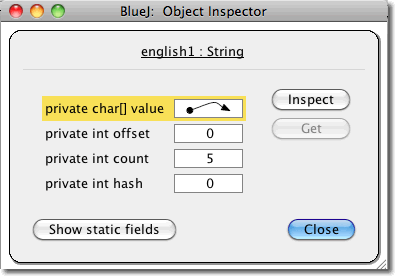
You will notice that first property of the string is an array of chars. The arrow signifies the pointer that points to the actual location of the array. While you don't need to know the other properties if you're curious the offset property stores the starting index of the char array (usually 0), the count stores the number of elements in the array, and the hash property stores a hash code that is created only after a call to the hashCode function. You can further inspect the char array to see the individual characters of the string as well as its length.
Knowing that strings contain a pointer that points the to actual location of the char array is important to know. Strings are considered immutable, meaning once they are assigned a memory location the data in that location does not change. The key is that even though the data in the memory location doesn't change you can change the pointer so it points to a new memory location. Consider the following diagram.
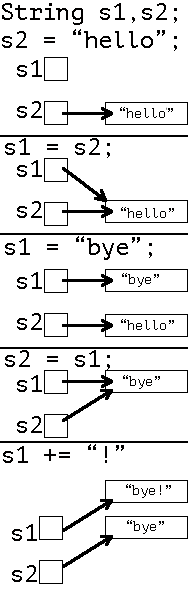
The rectangles represent the chunk of memory that stores the char array for each string. Note that when you assign a string equal to another string they point to the same memory chunk. When you change the value of one string, however, it is stored in a new location. That is because writing
s1 = "bye"is the same as writing
s1 = new String("bye").
public boolean equals(Object anObject)Parameters:
anObject- the object to compare this
Stringagainst.
Returns:
trueif the
Stringare equal;
falseotherwise.
String Comparisons
Comparing two strings using the == operator only returns true if the strings point to the same memory location. For this reason you should use the equals method to determine if the two strings are the same. Every object has a default equals methods that returns true if == would return true. This method can be overridden, however. Look at the following diagram showing three different strings.
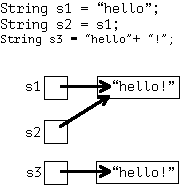
The following chart will show you the result of different functions on the above strings.
| Expression | Value |
|---|---|
| s1.equals(s2) | true |
| s1 == s2 | true |
| s1.equals(s3) | true |
| s1 == s3 | false |
| s2.equals(s2) | true |
| s2 == s3 | false |
The key thing to remember is that == only returns true if the strings point to the same memory location. For this reason you should mainly use the equals method to compare strings. There is one other option for comparing strings, however, called the compareTo method.
public int compareTo(String anotherString)Parameters:
anotherString- the
Stringto be compared.
Returns:
the value
0if the argument
Stringis equal to this
String; a value less than
0if this
Stringis less than the
Stringargument; and a value greater than
0if this
Stringis greater than the
Stringargument.
The compareTo method is available because the String class implements the Comparable class. The compareTo method returns an integer as the result and the output tells you the following:
- If string1.compareTo(string2) < 0, then string1 precedes string2.
- If string1.compareTo(string2) > 0, then string1 follows string2.
- If string1.compareTo(String) == 0, then the strings are identical.
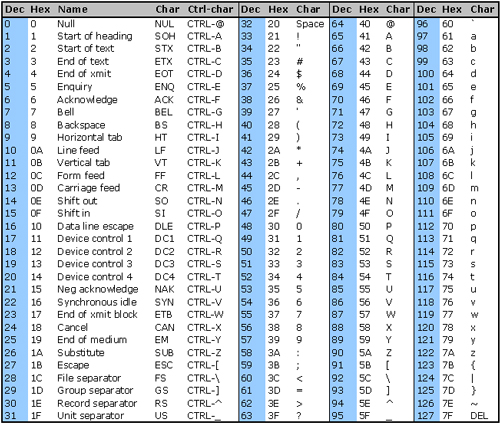
The method determines the order of strings by using the ASCII chart. The ASCII chart specifies that all numbers precede letters and all capital letters precede lowercase letters. You can view the standard ASCII chart to see this. That means 5 > "R" > "a".
public int length()Parameters:
None.
Returns:
the length of the sequence of characters represented by this
String.
String Methods
There are a number of useful methods that are included in the String class. The simplest is the length method, that returns the length of the string.
The substring method has two different versions. One version only takes an integer as a parameter and finds a substring from the parameter to the end of the string. The other takes two parameters and takes a substring from the first parameter to the character before the second parameter since the second parameter is not included in the substring. You can see the two substring implementations below.
public String substring(int beginIndex)Parameters:
beginIndex- the beginning index, inclusive.
Returns:
the specified substring.
Throws:
IndexOutOfBoundsException- if
beginIndexis negative or larger than the length of this
Stringobject.
Examples:
"unhappy".substring(2)//Returns "happy"
"cold".substring(4)   //Returns ""
"cold".substring(5)   //IndexOutOfBoundsException
The index starts at 0 so calling substring(2) starts at the third character. Note what happens with the second two calls to substring. One returns "", or an empty string. This is because the call does not exceed the length of the string, but there is no character at index 4 so an empty string is returned. The last call throws an exception because it goes past the length of the string. This would also happen if you sent the method a negative number.
public String substring(int beginIndex, int endIndex)Parameters:
beginIndex- the beginning index, inclusive.
endIndex- the ending index, exclusive.
Returns:
the specified substring.
Throws:
IndexOutOfBoundsException- if the
beginIndexis negative, the
endIndexis larger than the length of this
Stringobject, or the
beginIndexis larger than the
endIndex.
Examples:
"strawberry".substring(5,7)//Returns "be"
"crayfish".substring(4,8)  //Returns "fish"
"crayfish".substring(4,9)  //IndexOutOfBoundsException
"crayfish".substring(5,4)  //IndexOutOfBoundsException
It is important to know that the startIndex is included in the substring while the endIndex is not. You will also get an exception if the endIndex number is greater than the length of the string, the endIndex is less than the startIndex, or one of the numbers is negative.
Finally, the indexOf method determines if one string is contained within another. If it finds the substring it will return the index of the start of the substring. If it does not find the substring it will return -1.
public int indexOf(String str)Parameters:
str- any
String
Returns:
if the
Stringargument occurs as a substring within this object, then the index of the first character of the first such substring is returned; if it does not occur as a substring,
-1is returned.
Examples:
String s = "funnyfarm";
int x = s.indexOf("farm"); // x = 5
x = s.indexOf("farmer");  // x = -1
int y = s.length();      // y = 9
Again note that the index counting starts at 0 so "farm" is a substring starting at index 5 of "funnyfarm". The string "farmer" is not a of "funnyfarm" so x is changed to -1. There are actually four different versions of the indexOf method, but this is the only one we need to focus on for this course.